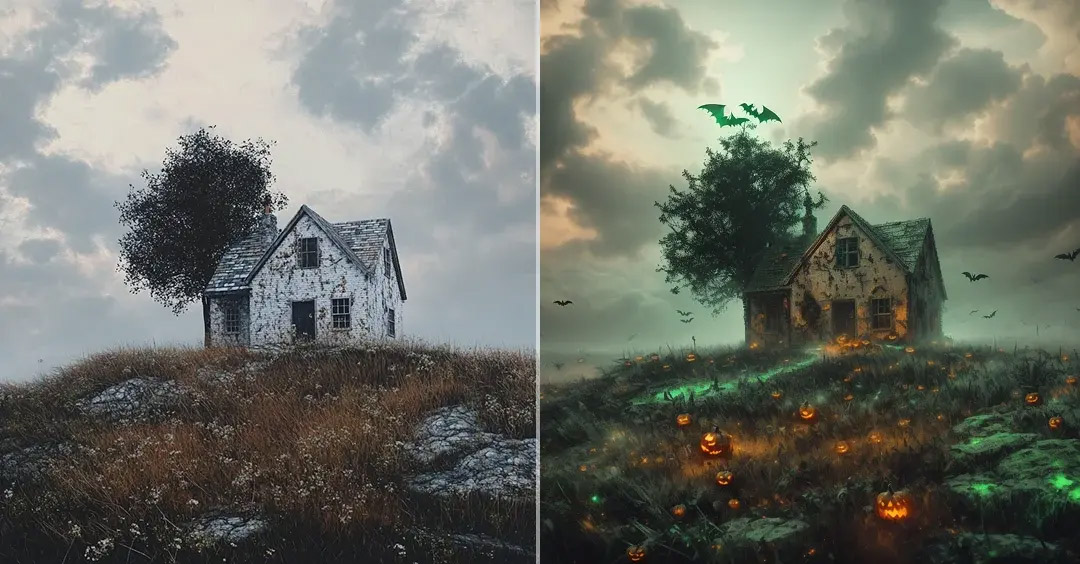
Halloween has always been a celebration built around creativity, costumes, special effects, and storytelling. Today, much of that creativity has moved into the digital world, where photos and videos can be transformed with a few taps. A halloween filter is one of the easiest ways to give ordinary content a spooky, mysterious, or playful appearance without needing professional editing skills.
From creepy portraits and haunted backgrounds to glowing eyes and cinematic color effects, digital Halloween filters make it possible to create engaging content for social media, short-form videos, invitations, and personal projects.
What Is a Halloween Filter?
A Halloween filter is a digital visual effect designed around Halloween-inspired themes. It can modify a photo or video by adding elements such as eerie lighting, supernatural effects, masks, costumes, shadows, makeup, or themed backgrounds.
Modern filters can go beyond simply placing a graphic over an image. Many use facial recognition and artificial intelligence to identify features and apply effects that follow the movement of a person’s face. This makes the result feel more natural, particularly when the filter is used for video content.
The style can vary considerably. Some effects are designed to look frightening, while others are humorous, colorful, or suitable for children and family-friendly celebrations.
Why Halloween Filters Are Popular
Visual content plays an important role in online communication. People often have only a few seconds to decide whether to watch a video or interact with a post. Seasonal effects provide a simple way to make familiar content feel different and timely.
Halloween filters are particularly useful because they can instantly establish a theme. A normal selfie, for example, can become part of a spooky story without requiring extensive editing.
They are also accessible. Instead of learning complicated editing software, users can experiment with ready-made effects and concentrate on the creative concept behind their content.
How Modern Filters Work
Behind a simple-looking filter can be several different technologies.
Facial Recognition
Many interactive effects use facial detection to locate features such as the eyes, nose, mouth, and overall face shape. The software can then position digital elements accurately as the person moves.
This is why effects such as masks, scars, makeup, or glowing eyes can remain aligned with a face throughout a video.
Augmented Reality
Augmented reality, or AR, combines digital elements with a real-world image or video. Halloween effects can use AR techniques to place virtual objects, atmospheric effects, or character features into the scene.
The result can make a simple recording appear more immersive without requiring a physical costume or elaborate set.
AI-Based Effects
Artificial intelligence is increasingly being used to create and modify visual content. AI-assisted tools can recognize objects, interpret images, generate visual elements, and produce more sophisticated transformations.
This has expanded the possibilities for seasonal content. Instead of relying only on fixed overlays, creators can experiment with effects that produce more complex visual changes.
Creative Ways to Use a Halloween Filter
There is no single correct way to use a Halloween effect. The best approach depends on the type of content being created.
Create Spooky Selfies
A portrait can become much more atmospheric with appropriate lighting and visual effects. Users can experiment with different levels of intensity to create anything from a subtle haunted appearance to a dramatic horror-inspired character.
Make Short-Form Videos
Halloween-themed effects work especially well in short videos. A creator can begin with a normal appearance and introduce the effect at a key moment, creating a simple visual transformation.
Timing is important. Applying an effect at the right point in a video can make the transition more surprising and entertaining.
Design Social Media Content
Seasonal content can help social media profiles feel current and relevant. Halloween effects can be incorporated into posts, stories, reels, or other short-form formats.
However, the filter should support the message rather than distract from it. A simple effect may be more effective than covering the entire screen with visual elements.
Create Halloween Invitations
Digital invitations can also benefit from themed photography and effects. A spooky portrait or atmospheric background can give an invitation a distinctive personality while keeping the overall design relatively simple.
Experiment With Storytelling
Filters can become part of a larger creative idea rather than simply being decorative. For example, a creator could use a transformation effect to represent a character discovering a supernatural ability or entering a mysterious environment.
This approach makes the visual effect part of the story.
Choosing the Right Halloween Effect
The most suitable effect depends on the intended audience and the mood of the content.
For a family-friendly project, colorful or playful effects may work better than realistic horror effects. For a dramatic short film, darker lighting, shadows, and cinematic effects may be more appropriate.
It is also worth considering the original image. A heavily detailed filter may look impressive on a simple background but become difficult to understand when the original scene already contains many visual elements.
A good filter should enhance the subject instead of hiding it.
Tips for Better Results
A few simple practices can significantly improve the final result.
Use good lighting. Even sophisticated effects can struggle when the original footage is extremely dark or poorly exposed.
Keep the camera steady. Stable footage generally makes tracking-based effects appear smoother.
Choose an appropriate background. A relatively clean background can help the main subject and digital effects remain clear.
Avoid over-editing. Using too many effects simultaneously can make a video feel cluttered.
Match the effect to the story. A filter should contribute to the intended mood rather than being added simply because it is available.
Preview before publishing. Check the effect across the entire clip, particularly if the subject moves significantly.
Halloween Filters and the Future of Digital Creativity
The technology behind digital filters continues to develop. What once required desktop editing software can now often be achieved through accessible online and mobile tools.
Artificial intelligence, augmented reality, facial tracking, and automated editing are making visual creation faster and more interactive. As these technologies improve, seasonal filters are likely to become increasingly customizable, allowing creators to produce effects that feel more closely connected to their individual concepts.
The larger trend is significant beyond Halloween. The same technologies can be used for celebrations, marketing campaigns, entertainment, education, and personal storytelling throughout the year.
Final Thoughts
A Halloween filter is more than a decorative effect. It is a practical creative tool that can help transform ordinary photos and videos into themed visual experiences. Whether the goal is to create a playful selfie, an atmospheric short video, a digital invitation, or a memorable social media post, the right effect can establish a Halloween mood quickly.
The key is to use technology thoughtfully. Instead of relying on an effect to carry the entire piece of content, combine it with good lighting, composition, timing, and an original idea. That balance can make digitally enhanced Halloween content feel more creative, polished, and engaging.