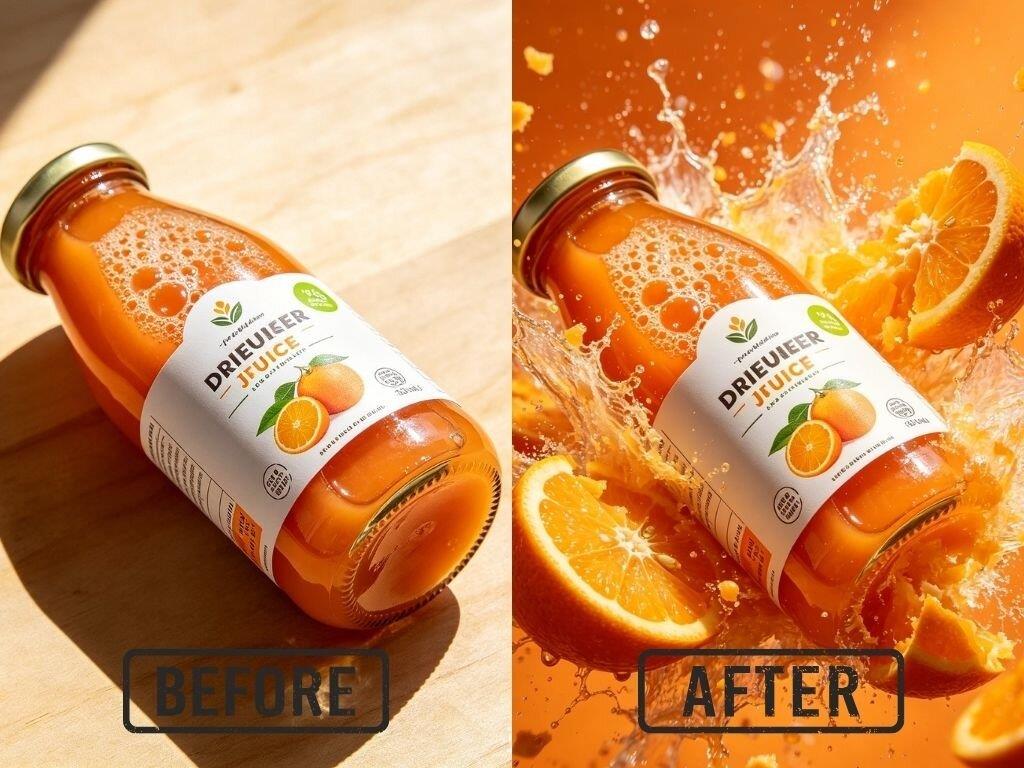
Designers face a lot of stress when they have to finish many projects at once. You might spend all day fixing small errors in photos. This takes away from the time you could spend on new ideas. Modern technology offers a solution to this problem. Using an AI photo editor helps you automate the tasks that used to take hours. You can clean up images, change colors, and fix lighting with just a few clicks. This makes your workflow much smoother and lets you focus on the art.
E-commerce is all about the visuals. If a product photo looks bad, people will not buy it. Designers often have to edit hundreds of photos for a single online store. You need to remove backgrounds and make sure the colors are accurate. A Free Image to Image Generator can help you create lifestyle images from simple product shots. You can place a bottle of water on a beach or a desk without ever leaving your office. This saves a lot of money on photographers and locations. It also allows you to test different looks to see what sells best.
Use Case 1: E-commerce Product Photography
Online stores need perfect images to build trust with customers. When a designer receives raw photos from a shoot, they are often full of distractions. There might be dust on the product, a shadow on the wall, or a background that does not match the website. AI tools allow you to fix these issues instantly. You can select the product and tell the software to remove everything else. This creates a clean look that makes the item stand out.
The benefits for e-commerce are clear. You save time because you do not have to draw lines around every object. The AI understands what the product is and where the edges are. It can even handle difficult things like hair, fur, or transparent glass. This means you can process an entire catalog of items in a single morning. Your clients will be happy because their store looks professional and consistent.
Use Case 2: Social Media Content Creation
Social media managers need a constant stream of new images. If you post the same thing every day, your audience will get bored. Designers use AI to turn one photo into many different styles. You can take a simple picture of an office and turn it into a neon city or a watercolor painting. This keeps your feed fresh and interesting. It also helps you match the visual style of different platforms without starting from scratch.
Using AI for social media also helps with branding. You can set specific rules for the AI to follow, such as using certain colors or fonts. This ensures that every post looks like it belongs to your brand. You can also use these tools to resize images for different platforms. A square post for Instagram can become a tall story for TikTok in seconds. The AI fills in the extra space so the image does not look stretched or cropped.
Use Case 3: Real Estate Marketing
Real estate agents rely on beautiful photos to attract buyers. An empty house often looks small and cold in a photo. Designers use AI to perform virtual staging. This involves adding digital furniture, rugs, and art to a room. It helps potential buyers see how the space could look once they move in. It is a much cheaper option than hiring a staging company to move real furniture into the house.
AI also helps with outdoor photos. If the photographer visited on a cloudy day, the house might look gloomy. You can use AI to swap the gray sky for a bright blue one. You can also make the grass look greener or remove a neighbor’s trash can from the edge of the frame. These small edits make the property look much more appealing. This leads to more clicks on the listing and faster sales for the agent.
Use Case 4: Branding and Concept Art
When you start a new branding project, you need to explore many ideas. You might want to see how a logo looks on a t-shirt, a coffee cup, or a billboard. AI tools can generate these mockups for you. You just upload your design and choose the object you want to see it on. This helps you show the client a finished vision of their brand. It makes your presentations look much more professional.
AI is also great for brainstorming. If you are stuck on an idea, you can type a few keywords into the tool. It will generate several images based on your words. You might not use the exact image it creates, but it can give you a new perspective. You can see how different lighting or compositions work for your concept. This speeds up the early stages of design and helps you find the right direction faster.
Benefits per Scenario
| Task | Traditional Method | AI Method |
| Background Removal | Manual pen tool work | Automatic one click |
| Image Upscaling | Becomes blurry | Stays sharp and clear |
| Object Removal | Clone stamp tool | Smart content fill |
| Sky Replacement | Complex masking | Instant sky swap |
| Color Matching | Manual slider adjustments | Automatic tone balance |
| Virtual Staging | Moving real furniture | Adding digital assets |
The table above shows how much time you can save. In the traditional method, a designer might spend twenty minutes just cutting out a person from a background. With AI, that same task takes less than five seconds. This adds up over a whole day of work. You can finish four or five projects in the time it used to take to finish one. This allows you to earn more money or have more free time.
Another benefit is the quality of the work. AI does not get tired. If you are editing your fiftieth photo of the day, you might make a mistake. The AI will perform the same way on the first photo and the last photo. This consistency is very important for big brands that need everything to look perfect. You can trust the tool to handle the repetitive parts of the job while you focus on the creative decisions.
Practical Workflow for Designers
To get the best results, you should follow a simple workflow. Start by choosing a high quality base image. Even though AI can fix many things, a good starting point always helps. Upload your file to the tool and decide what you want to change. If you are removing a background, let the AI do its work first. Then, look closely at the edges to see if anything needs a quick touch up.
Next, move on to color and lighting. You can use AI to balance the levels so the image looks natural. If you are creating a composite, make sure the lighting on your subject matches the lighting of the new background. This is where your skills as a designer are most important. The AI provides the pieces, but you put them together. Finally, export your work in the right format for your project.
- Define the goal of the project.
- Select the best original photos.
- Use AI for heavy lifting like masking and cleaning.
- Apply brand colors and specific styles.
- Review the final image for small errors.
- Save and deliver to the client.
This process is much faster than the old way of doing things. You don’t have to worry about the technical details as much. You can spend more time thinking about the story you want to tell with your visuals. Clients will appreciate the fast turnaround and the high quality of the images. It makes you a more valuable designer in a competitive market.
Conclusion
AI tools are changing the way designers work for the better. They take away the boring and repetitive tasks that cause burnout. You can process more images, create more concepts, and deliver better results in less time. Whether you work in e-commerce, real estate, or social media, these tools offer something for you. You’ll find that your creativity grows when you aren’t stuck doing manual chores all day. Start using these tools in your daily work and see how much your productivity improves. You will be able to handle bigger projects and more clients without feeling overwhelmed.