The Evolution of Cloud Computing and Web Hosting Infrastructure
The history of web hosting is a story of physical constraints. In the early days of the internet, hosting meant renting space on a single, tangible piece of hardware located in a data center. If your website experienced a sudden surge in visitors, your server would likely crash because it had a fixed limit on processing power and memory. This “all eggs in one basket” approach was the standard for decades, but it was inherently fragile. Capacity planning also required businesses to predict demand far in advance, often leading to expensive hardware that remained underused for long periods or insufficient resources during unexpected traffic spikes.
Today, we have moved into an era of virtualization and resource pooling. Instead of relying on a single physical machine, modern cloud hosting draws from a vast, distributed network of servers. Through virtualization, we can carve out “virtual” slices of these powerful resources, allowing us to spin up or wind down capacity in real-time. This dynamic provisioning means that your infrastructure can grow alongside your business, rather than acting as a bottleneck.
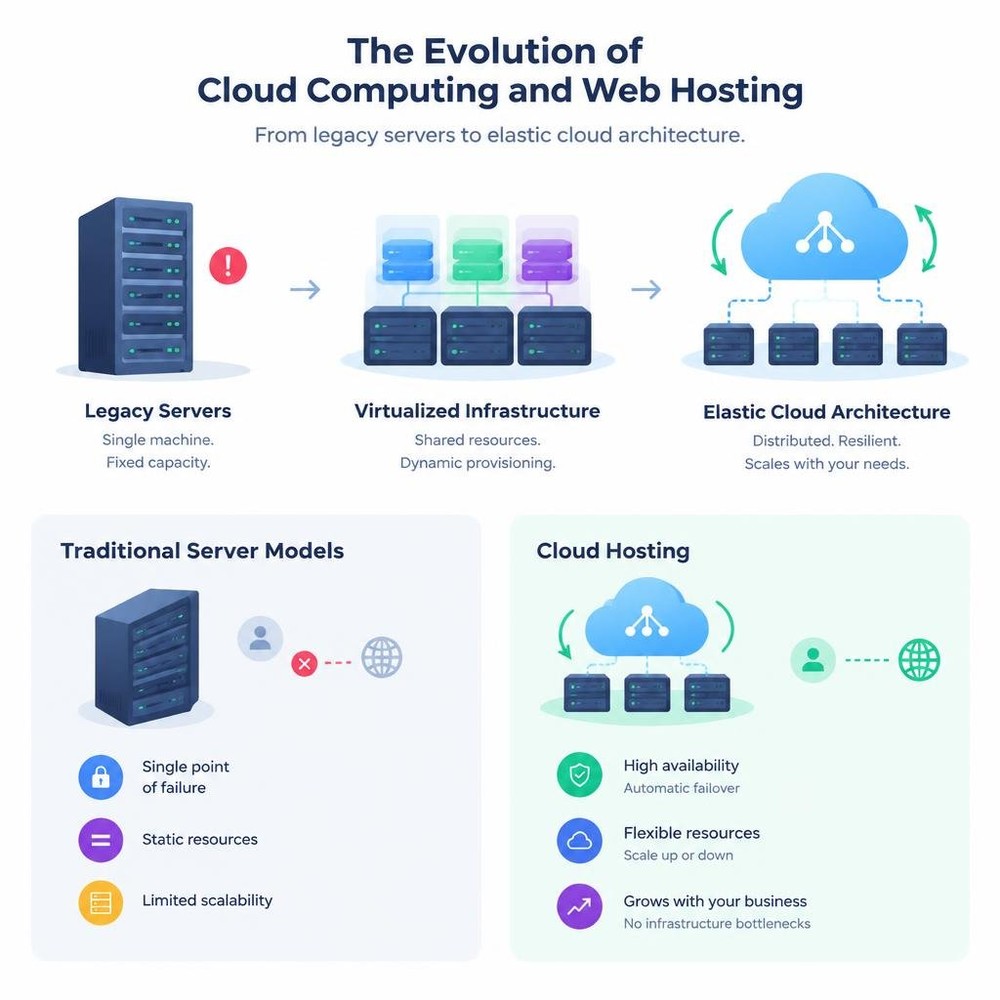
Traditional Server Models vs Virtualized Infrastructure
To understand why the industry is shifting, we must look at the fundamental differences between legacy and cloud models. Traditional hosting relies on shared or dedicated servers where resources are static. If you pay for 8GB of RAM, that is your limit, regardless of whether your site is quiet or overwhelmed.
Conversely, cloud hosting utilizes a distributed architecture. If one physical server in the provider’s network encounters an issue, your application simply migrates to another healthy node. This eliminates the single point of failure that plagued traditional web hosting. In practice, availability still depends on how the application is designed, but cloud platforms provide the building blocks—such as redundant zones, health checks, and load balancing—to enable faster, more automated recovery.
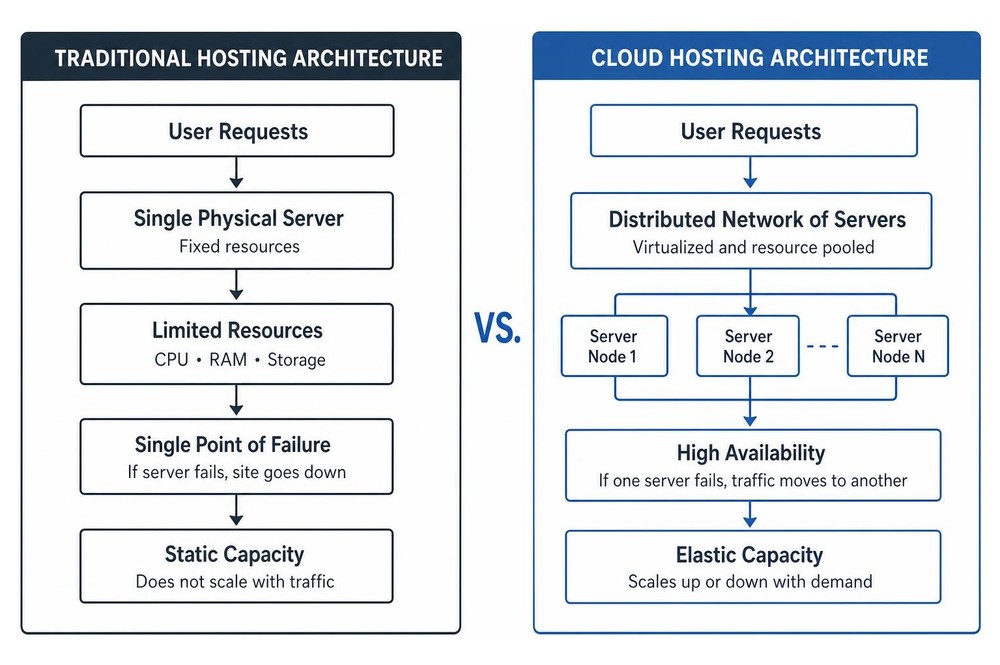
Bridging Cloud Computing and Web Hosting for Modern Scalability
The true power of the cloud lies in its elasticity. When your application requires more power, the cloud can automatically allocate additional CPU or memory, and when traffic subsides, it scales back down to save costs. This is a massive departure from the old model of purchasing hardware based on “peak” traffic expectations. Auto-scaling policies can be based on measurements such as CPU utilization, request volume, queue depth, or scheduled business events, giving teams flexibility in how they prepare for demand.
As you explore options for your digital presence, you might look into AI-assisted website building to streamline the design process. When paired with the auto-scaling capabilities of cloud infrastructure, you create a system that is not only beautiful but also capable of handling global traffic without manual intervention. By integrating automated deployment pipelines, you ensure that your code is consistently tested and pushed to production environments, reducing the risk of human error.
Core Architectural Components of Modern Cloud Hosting
Modern cloud hosting is built on a modular foundation. Rather than a monolithic server, you are working with a collection of specialized services. This separation makes it easier to replace, scale, or secure individual components without redesigning the entire application.

- Virtual Compute: These are your workhorses. They act like traditional servers but can be resized, cloned, or destroyed via code.
- Object Storage: Unlike local file systems, object storage provides virtually infinite, highly durable space for media, backups, and static assets.
- Managed Databases: Offloading the complexity of database maintenance—such as patching, backups, and replication—to the cloud provider allows your team to focus on application logic.
- Virtual Private Networks (VPNs): These allow you to create a private, isolated section of the cloud where you can launch resources in a virtual network you define.
Service Models: IaaS, PaaS, and Serverless Execution
Understanding the “as-a-service” model is essential for choosing your hosting strategy. Infrastructure as a Service (IaaS) gives you the most control, letting you manage the operating system and network settings. Platform as a Service (PaaS) abstracts away the server management, letting you focus entirely on your code.
For those looking to integrate AI-native software, the serverless model is particularly compelling. In a serverless environment, you don’t manage servers at all; you simply provide the code, and the cloud provider executes it in response to events. This is the ultimate form of cost-efficiency, as you only pay for the exact milliseconds your code runs. Serverless functions are especially useful for event-driven tasks such as image processing, scheduled jobs, form submissions, and API endpoints that experience variable traffic.
Implementing Infrastructure as Code and Automation
Managing cloud resources via a web console is fine for learning, but it is not sustainable in production. Infrastructure as Code (IaC) allows you to define your entire environment—servers, databases, and networking—in text files.
By using declarative templates, you can version-control your infrastructure just like you do your application code. This ensures that your staging and production environments are identical, eliminating the “it works on my machine” problem. When you need to scale, you simply update your template, and the cloud provider automatically provisions the necessary resources. Code review and automated validation can also catch configuration mistakes before they reach a live environment.
Best Practices for Cloud Deployment, Security, and Governance
Security in the cloud is a shared responsibility. While providers like AWS, Azure, and Google Cloud secure the physical hardware, you are responsible for securing the data and access points within your environment.

Security Frameworks in Cloud Computing and Web Hosting
Always start with the principle of least privilege. Every user or application should have only the minimum permissions necessary to perform its job. Never use root-level accounts for daily tasks; instead, create individual user identities with specific roles. Furthermore, enforcing Multi-Factor Authentication (MFA) across all accounts is the single most effective way to prevent unauthorized access.
Security should also include encryption for data in transit and at rest, regular review of access logs, and a documented process for rotating credentials. Separating development, testing, and production environments helps limit the impact of an accidental change or compromised account.
Continuous Monitoring and Cost Optimization Strategies
The flexibility of the cloud is a double-edged sword: without monitoring, costs can spiral. Implement automated alarms that notify you when your spending exceeds a threshold or your CPU usage reaches a critical level. Regularly review your resources to identify “zombie” assets—such as unattached storage volumes or idle compute instances—that are costing you money without providing value. Right-sizing your resources is an ongoing process; ensure that the power you are paying for matches the actual demand of your application.
Common Architecture Patterns for Resilient Web Applications
Designing for the cloud requires a mindset shift toward modularity and fault tolerance.
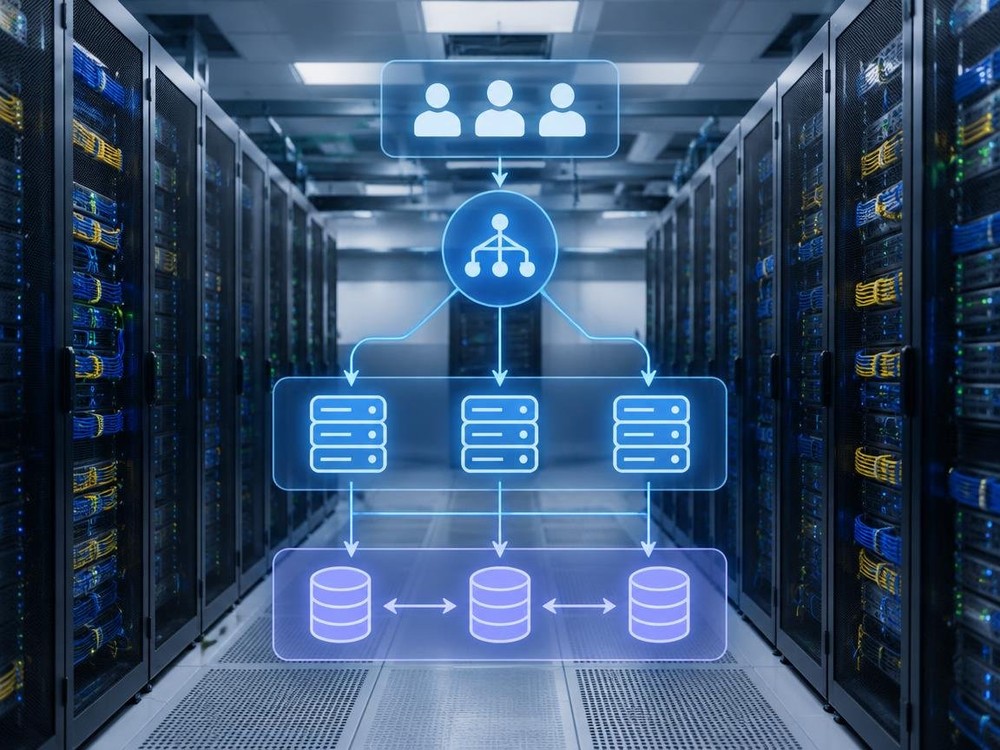
Multi-Tier Distributed Web Applications
A standard, resilient architecture involves separating your application into tiers. The presentation tier (where your users interact) is separated from the application logic tier, which in turn is separated from the database tier. By placing these in different subnets and using load balancers, you ensure that if one component fails, the rest of the application remains functional. Database replication across multiple geographic zones ensures that your data remains safe and accessible even in the event of a regional outage. Designing application servers to be stateless further simplifies scaling, because any healthy instance can process a request without depending on information stored only on another server.
Edge Delivery and Static Asset Distribution
To provide a seamless experience for global users, leverage Content Delivery Networks (CDNs). A CDN caches your static assets—like images, CSS, and JavaScript—at “edge” locations closer to your users. This drastically reduces latency, as the data doesn’t have to travel across the globe to reach the user’s browser. When combined with static storage, this pattern is one of the most cost-effective ways to host high-performance content.
Frequently Asked Questions About Cloud Hosting
What is the primary difference between cloud hosting and traditional web hosting?
The primary difference is the abstraction of hardware. Traditional hosting is tied to specific physical servers, whereas cloud hosting uses virtualized resources spread across a distributed network. This allows for dynamic scaling and greater resilience to hardware failures.
How do cloud service models impact cost and maintenance overhead?
Cloud models shift costs from capital expenditure (buying hardware) to operational expenditure (paying for what you use). Managed services reduce maintenance overhead by handling updates, backups, and security patching, allowing your team to focus on development rather than server administration.
What steps are essential for securing a new cloud environment?
The most critical steps include isolating your root account, implementing IAM (Identity and Access Management) with the principle of least privilege, enabling MFA on all accounts, and setting up automated billing alerts to prevent unexpected costs.
Conclusion
Transitioning to cloud computing and web hosting is more than just a technical upgrade; it is a strategic move toward digital resilience. By embracing virtualization, automation, and distributed architectures, you position your organization to handle growth with ease. While the shift from traditional hosting may seem complex, the benefits of scalability, cost-efficiency, and global reach are transformative. Whether you are building a personal portfolio or a global enterprise application, the cloud provides the tools to turn your vision into a reliable, high-performance reality. Start small, prioritize security from day one, and let your infrastructure evolve alongside your success.